

Checkout widget
AfterpayWidgetView shows the customer’s payment schedule: the four installment amounts, when each one is due, and the amount due today. It shows Afterpay branding, or Clearpay branding for UK merchants. For US merchants, it shows Cash App Afterpay branding.
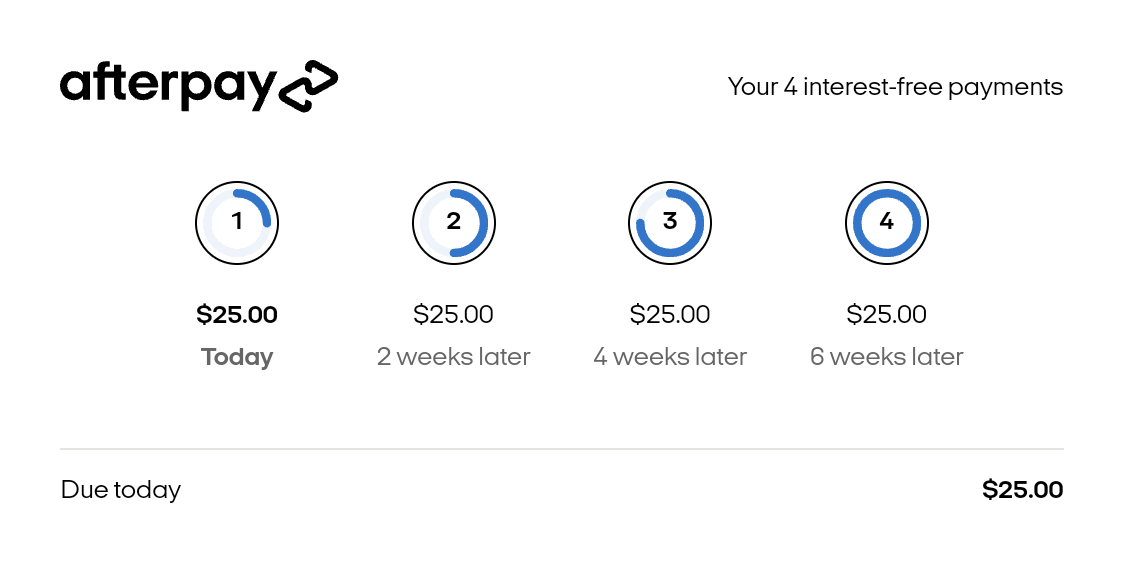
Use the widget on your order review screen when the order total can still change after checkout, for example because of shipping costs or promo codes. The widget also reports when the customer can’t complete the purchase, for example because the order exceeds their Afterpay limit.
The widget is a WebView that loads its content from Afterpay, so the device needs an internet connection.
Before you begin
Set the merchant configuration before you initialize the widget. If the configuration isn’t set, the widget throws an IllegalStateException when it finishes loading, or when you call update. See UI components.
Add the widget
Add the widget to a layout or create it in code:
XML
Kotlin
The widget has no XML attributes. It doesn’t display anything until you call one of its init methods.
The widget resizes to fit its content. Don’t constrain it to a smaller size, so that the content stays legible.
Initialize the widget
Call init with one of the following:
- A checkout token: use the token returned by a successful Built-in UI checkout. The widget shows the details of that order.
- An amount: if the customer hasn’t completed checkout, or your app doesn’t use Built-in UI, pass the order total as a
BigDecimal.
Checkout token
Amount
If the token is blank, init throws an IllegalStateException.
Handle the callbacks
Both init methods take three callbacks:
Money has two properties: amount, a BigDecimal, and currency, a java.util.Currency. The checksum identifies the payment schedule that the widget displays.
Hide the logo or heading
The widget shows the logo and a heading by default. To hide either one, pass showLogo or showHeading to init:
Update the total
When the order total changes, for example after the customer picks a shipping option, pass the new total to update:
The widget calls onUpdate with the new amount due today, or onError if the new total isn’t valid.
Visibility
The widget hides itself when the SDK isn’t enabled for the current configuration. It checks when you call init or update. See When components are hidden.
AfterpayWidgetView sets its own WebViewClient and WebChromeClient. Calls to setWebViewClient and setWebChromeClient have no effect.