
For AI agents: a documentation index is available at the root level at /llms.txt and /llms-full.txt. Append /llms.txt to any URL for a page-level index, or .md for the markdown version of any page.
HomeGuidesAPI Reference
  • Welcome
    • Business Hub
  • Platforms
    • Platforms Quickstart
    • Adyen
      • Introduction
      • Getting Started
      • Add Payment Option
      • Afterpay Site Messaging
    • Ecwid
    • Shopify
    • Stripe
  • Afterpay Messaging
    • Getting Started
    • Implementation
    • Migration
    • Legacy Messaging Products
    • Launch Afterpay Info Modal Anywhere
  • API Development
    • API Quickstart
    • Test Environments
    • Certification
    • Disputes
    • Upgrade from API v1 to v2
  • SDK
    • iOS SDK
    • Android SDK
    • React Native SDK
    • PHP SDK
  • Marketing
    • Shop Directory
    • Brand Assets
LogoLogo
On this page
  • Configuration
PlatformsBigCommerce

Add Payment Option

Was this page helpful?
Previous

Afterpay Site Messaging

Next
Built with

Configuration

Completing the below steps will enable and display Afterpay as a Payment Method.

  1. Navigate to: BigCommerce Control Panel.
  2. Navigate to: Settings > Payments
  3. Under the ‘Online Payment Methods’ section, click on the drop-down arrow.

add-payment-option-1.png

  1. Locate ‘Afterpay’ from the Online Payment Methods list and click the ‘Set up’ button.

add-payment-option-2.png

  1. Enter the Merchant ID provided by Afterpay into the Merchant Id field.
  2. Enter the Secret Key provided by Afterpay into the Secret Key field.
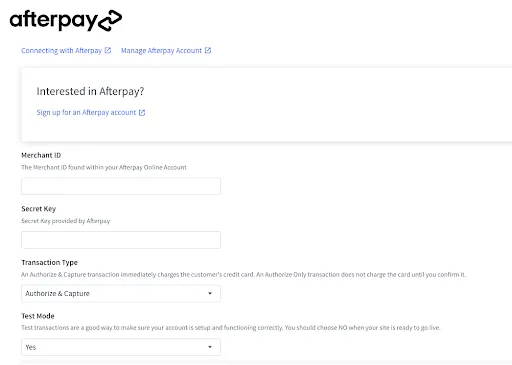
add-payment-option-3.png

  1. Additionally, you can configure the following settings:
  • Transaction Type — can be set to Authorize & Capture or Authorize Only.
    Authorize Only allows you to capture the funds manually. See Manually Capturing Transactions (Authorize Only) to learn more.
  • Test Mode — set this to Yes to test checkout flow. Make sure this is set to No when your store goes live.
Note

You need Afterpay Sandbox Credentials to use Test Mode. Please contact your Afterpay Delivery Manager for assistance.

  1. Click the Save button.