For AI agents: a documentation index is available at the root level at /llms.txt and /llms-full.txt. Append /llms.txt to any URL for a page-level index, or .md for the markdown version of any page.
HomeGuidesAPI Reference
  • Welcome
    • Business Hub
  • Platforms
    • Platforms Quickstart
    • Adyen
    • Ecwid
    • Shopify
    • Stripe
      • Introduction
      • Getting Started
      • Install Plugin
      • Configure Plugin
      • Update Plugin
      • Advanced Configuration
      • Currency Conversion
      • FAQ
  • Afterpay Messaging
    • Getting Started
    • Implementation
    • Migration
    • Legacy Messaging Products
    • Launch Afterpay Info Modal Anywhere
  • API Development
    • API Quickstart
    • Test Environments
    • Certification
    • Disputes
    • Upgrade from API v1 to v2
  • SDK
    • iOS SDK
    • Android SDK
    • React Native SDK
    • PHP SDK
  • Marketing
    • Shop Directory
    • Brand Assets
LogoLogo
On this page
  • WordPress Version
  • WooCommerce Version
  • Store Currency
PlatformsWooCommerce

Getting Started

Was this page helpful?
Previous

Install Plugin

Next
Built with

What are the requirements for the Afterpay WooCommerce Plugin?


WordPress Version

The WordPress version must be 4.8.3 or greater to integrate with Afterpay.

To find the WordPress version number, look at the bottom right corner of the WordPress Admin Dashboard.

WooCommerce Version

The WooCommerce version must be 3.2.6 or greater to integrate with Afterpay.

To find the WooCommerce version number:

  1. Navigate to WordPress Admin > Plugins > Installed Plugins.

    Getting-started-1.png

Store Currency

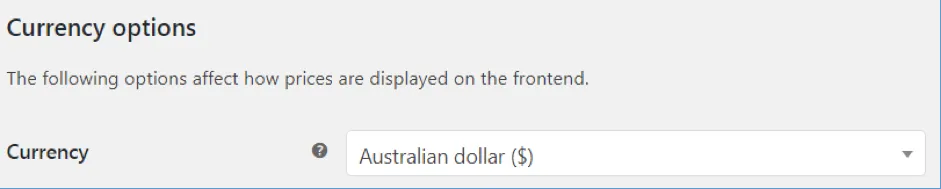
Please note that Store Currency must correspond to the Afterpay account region. To check this:

  1. Navigate to: WordPress Admin > WooCommerce > Settings > General.

  2. Under Currency options, the currency must be one of:

  • 🇦🇺 Australian dollar ($)

  • 🇳🇿 New Zealand dollar ($)

  • 🇨🇦 Canadian dollar ($)

    Getting-started-2.png

Supported Countries

Afterpay is available for WooCommerce merchants with a store in these countries:

  • 🇦🇺 Australia

  • 🇳🇿 New Zealand

  • 🇨🇦 Canada Afterpay is known as Clearpay and is available for WooCommerce merchants with a store in these countries:

  • 🇬🇧 United Kingdom

Afterpay is known as Cash App Afterpay and is available for WooCommerce merchants with a store in these countries:

  • United States

Express Checkout is available in all supported countries with Version 3.1.0 and above.