For AI agents: a documentation index is available at the root level at /llms.txt and /llms-full.txt. Append /llms.txt to any URL for a page-level index, or .md for the markdown version of any page.
HomeGuidesAPI Reference
  • Welcome
    • Business Hub
  • Platforms
    • Platforms Quickstart
    • Adyen
    • Ecwid
    • Shopify
      • Getting Started
      • Add Afterpay at Checkout
      • Add Cash App Pay at Checkout
      • Afterpay On-Site Messaging App
      • Manually Add Afterpay Site Messaging to Theme
      • Shopify Manual Capture
      • Shopify Order Reconciliation
      • Shopify Test Mode
      • Add an Afterpay Banner to Shopify
      • Hide Payment Methods at Checkout
      • FAQ
    • Stripe
  • Afterpay Messaging
    • Getting Started
    • Implementation
    • Migration
    • Legacy Messaging Products
    • Launch Afterpay Info Modal Anywhere
  • API Development
    • API Quickstart
    • Test Environments
    • Certification
    • Disputes
    • Upgrade from API v1 to v2
  • SDK
    • iOS SDK
    • Android SDK
    • React Native SDK
    • PHP SDK
  • Marketing
    • Shop Directory
    • Brand Assets
LogoLogo
On this page
  • Supported Countries
  • Store Address
  • Store Currency
  • Payment Settings
PlatformsShopify

Getting Started

Was this page helpful?
Previous

Add Afterpay at Checkout

Next
Built with

What do I need to add Afterpay to my Shopify Store?


Supported Countries

Afterpay is available for Shopify merchants with a store address in these countries:

  • USA - See Afterpay US
  • Australia
  • New Zealand
  • Canada
  • UK - See Clearpay guide
Note

Afterpay US and Cash App Pay are only available in the USA.

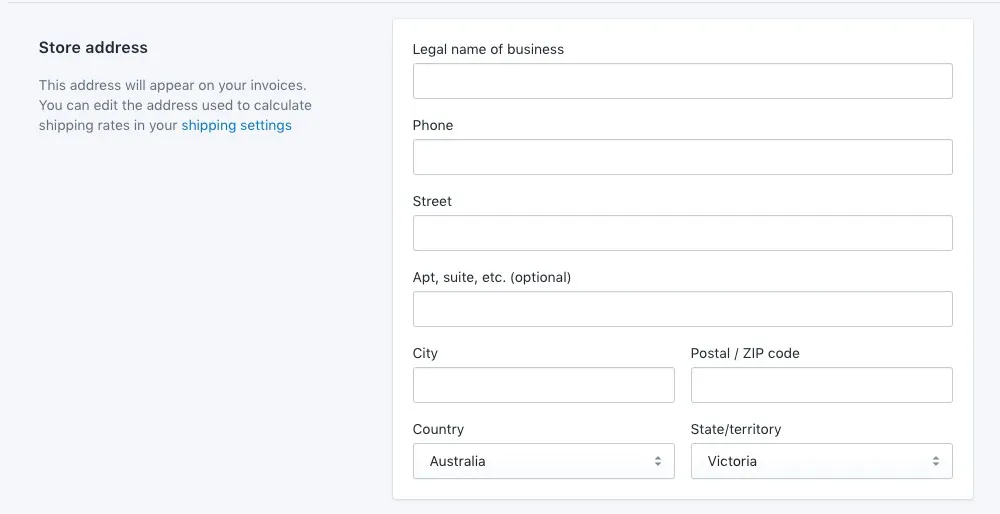
Store Address

The store address must correspond to the Afterpay account region.

Do the following:

  1. Go to Shopify Admin > Settings > General.

  2. Under Store Address, the Country must be one of the following:

    • Australia
    • Canada
    • New Zealand
    • United States

Shopify-1.png

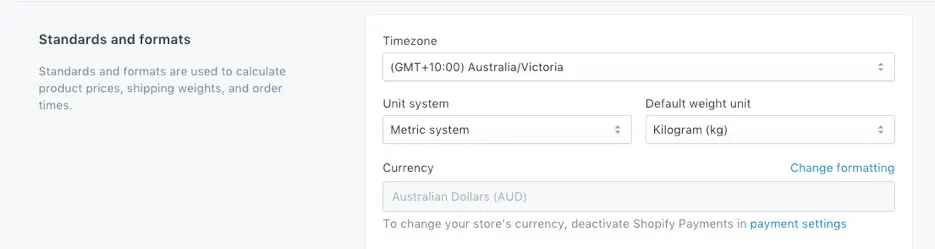
Store Currency

The store currency must correspond to the Afterpay account region.

To set the store currency:

  1. Go to: Shopify Admin > Settings > General.

  2. Under Standards and formats, the Currency must be one of these:

    • United States Dollars (USD)
    • Australian Dollars (AUD)
    • New Zealand Dollars (NZD)
    • Canadian Dollars (CAD)

shopify-2.png

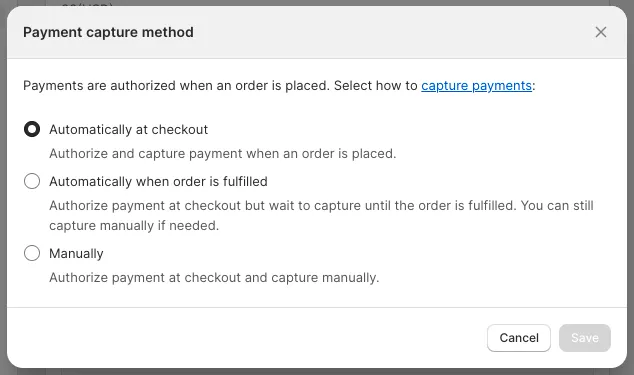
Payment Settings

Check if you have Automatically at checkout or Automatically when order is fulfilled enabled.
shopify-get-started-1.png

In the Payment Settings, you can also apply manual capture for all payment types. If you have enabled Manually, follow these instructions:

Shopify Manual Capture